Turning Biweekly Sales Emails into an AI-Powered Knowledge Assistant
- Purvish Shah
- My Projects
- 19 Sep, 2026
In many organizations, some of the most valuable business intelligence is not stored in a CRM field or a reporting dashboard. It is buried inside emails.
Client Partnership and Business Development teams, together with Product Specialists, regularly send biweekly updates to colleagues and leadership. These messages describe what happened during the previous two weeks: client meetings, prospect conversations, product interest, possible upsell opportunities, changes in sentiment, reasons behind a client’s reaction, follow-up commitments, and estimates of potential investment size.
The updates are rich in context, but difficult to use after they reach the inbox.
I designed an enterprise AI solution to transform these recurring emails into a searchable, citation-backed knowledge source. The goal is not merely to summarize emails. It is to help authorized users ask better questions, identify missed follow-ups, compare developments over time, and retrieve the evidence behind every answer.
This case study is intentionally generalized. Company names, client identities, internal data, financial figures, and proprietary business rules are not included.
The Business Problem
A biweekly update can contain information such as:
- A client’s reaction to a recent meeting.
- Why sentiment became more positive or negative.
- Interest in a particular strategy or product.
- A potential cross-sell or upsell opportunity.
- The estimated size of a possible investment.
- A commitment to send material or arrange another meeting.
- A reason an opportunity slowed down or was lost.
- A new contact or decision-maker involved in the relationship.
This information is useful to leadership, Sales, Product Specialists, Investor Relations, and other client-facing teams. However, the email format creates several challenges.
First, the information is unstructured. Every person writes updates differently. One person may organize the message by client, another by product, and another as a narrative.
Second, important facts are mixed with signatures, disclaimers, quoted email chains, and formatting. Those elements create noise for search and AI processing.
Third, knowledge becomes fragmented across multiple reporting periods. Understanding an opportunity may require comparing the current update with several previous updates.
Finally, leadership can read the emails, but cannot easily ask cross-cutting questions such as:
- Which prospects showed stronger interest during the last month?
- Which clients mentioned a specific strategy or fund?
- Where did sentiment change, and what reason was provided?
- Which promised follow-ups do not appear in a later update?
- Which opportunities may have stalled without a clearly documented next step?
- What is the potential investment range associated with current opportunities?
The real problem was not email summarization. It was converting distributed narrative updates into governed institutional knowledge.
The Solution
The proposed solution uses an event-driven Azure ingestion pipeline and a retrieval layer that can be exposed to approved AI assistants through Model Context Protocol tools.
When a new update arrives in a shared mailbox, Power Automate triggers an Azure Function. The complete processing workflow is contained inside the Function so that the business logic, error handling, monitoring, and indexing steps remain centralized.
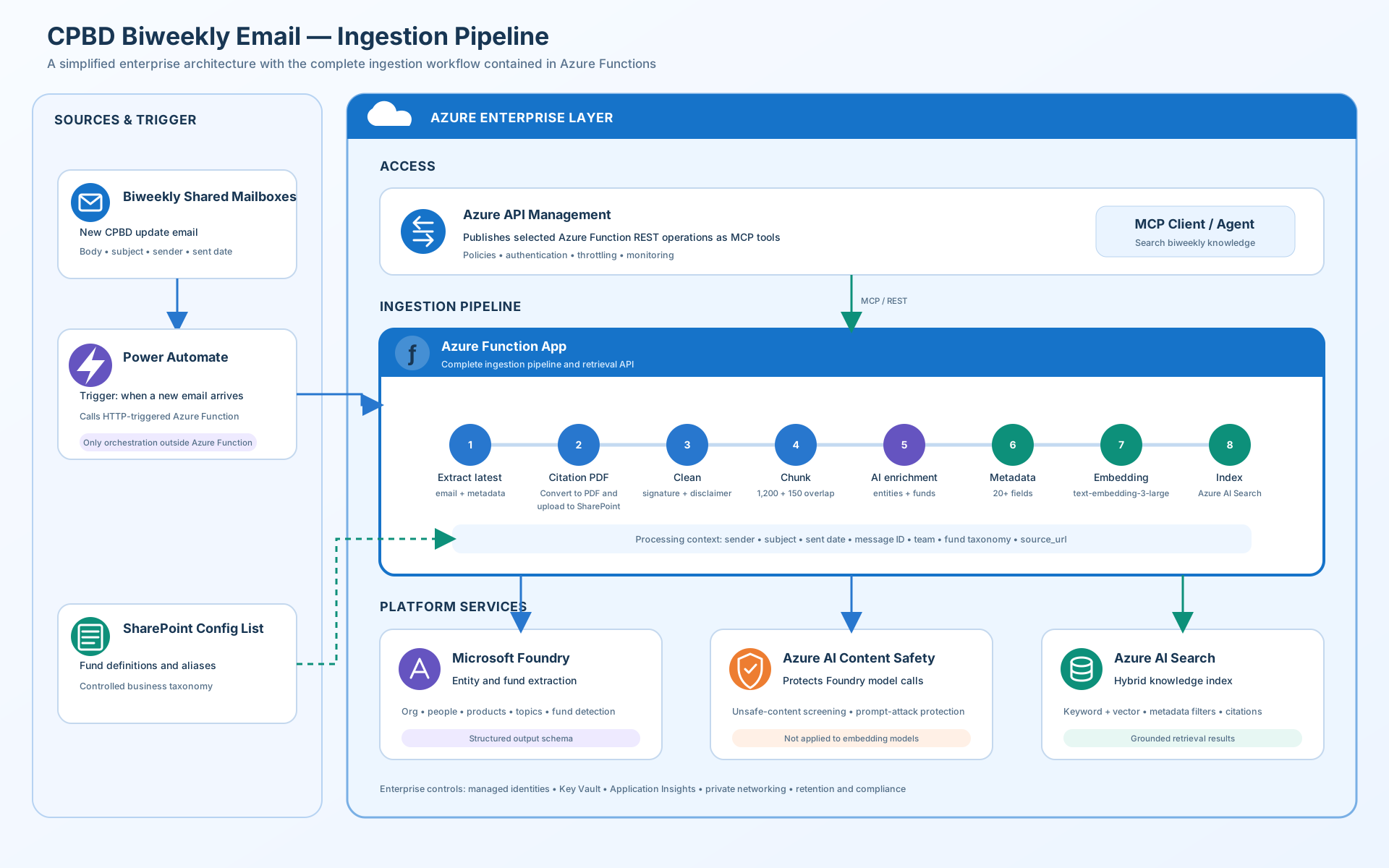
The ingestion pipeline performs eight main operations.
1. Extract the Latest Message
Email conversations frequently include the entire previous thread. The Function isolates the newest contribution while retaining essential metadata such as sender, subject, sent date, team, and message identifier.
This prevents older quoted content from being treated as a new update.
2. Create a Citation Document
The latest message is converted to PDF and uploaded to a controlled SharePoint library. The PDF location is stored as source_url with the indexed content.
This is an important design decision. AI-generated answers should not ask users to trust an unsupported summary. Users should be able to open the original source and confirm the evidence.
3. Clean the Message
The Function removes signatures, standard legal disclaimers, repeated thread content, and unnecessary formatting. Cleaning reduces noise without changing the business meaning of the update.
4. Create Retrieval-Friendly Chunks
The cleaned message is divided into approximately 1,200-character chunks with a 150-character overlap.
The overlap helps preserve context when a client discussion or opportunity description crosses a chunk boundary. The chunk size can later be tuned using retrieval evaluation rather than treated as a permanent assumption.
5. Enrich Each Chunk with AI
Each chunk is sent to a model deployed through Microsoft Foundry. The model returns structured information such as:
- Organizations
- People
- Products and strategies
- Discussion topics
- Client or prospect context
- Sentiment and the stated reason for that sentiment
- Potential opportunity or investment-size references
- Follow-up actions
- Fund mentions
Fund detection is supported by definitions and aliases maintained in a SharePoint configuration list. This separates frequently changing business vocabulary from application code.
Azure AI Content Safety can be applied around generative model interactions to support harmful-content screening and prompt-attack protection.
6. Build Business Metadata
The Function combines the extracted information with email metadata to create more than 20 searchable properties. Examples include team, sender, sent date, organization, people, products, funds, topics, sentiment, action items, chunk identifier, message identifier, and citation URL.
This metadata makes it possible to combine semantic retrieval with precise filters.
7. Generate Embeddings
The enriched chunk is converted into a vector using the text-embedding-3-large model.
Embeddings help retrieve conceptually related information even when the user’s wording differs from the original email. For example, a question about “increased allocation interest” may retrieve an update that uses the phrase “considering a larger commitment.”
8. Index the Result
The chunk, embedding, metadata, and citation URL are uploaded to Azure AI Search.
The search layer supports a hybrid retrieval strategy:
- Keyword search for exact names and terminology.
- Vector search for conceptual similarity.
- Metadata filtering for dates, teams, clients, products, or funds.
- Citations that connect answers to the original PDF.
Azure API Management provides the governed access layer. Selected Azure Function retrieval operations can be exposed as MCP-compatible tools for approved agents and enterprise applications.
From Search to Recommendation
The most valuable capability is not finding an old email. It is helping teams recognize what may require attention.
An AI assistant could answer questions such as:
- “Show all positive client sentiment changes related to this product during the last six weeks.”
- “Which prospects discussed a potential allocation but have no documented next meeting?”
- “What follow-up actions were promised in the previous update, and which ones are not mentioned as completed?”
- “Why did this opportunity lose momentum?”
- “Which client conversations may create an upsell opportunity?”
- “Summarize the history of this prospect and cite the source updates.”
- “Which opportunities have a potential investment size but no clearly assigned next action?”
Recommendations must remain explainable. Instead of saying, “Sales missed this opportunity,” the assistant should present evidence-based language:
A follow-up was committed in the May 5 update, but no completion or subsequent meeting was identified in later indexed updates. Consider confirming the status with the relationship owner.
This distinction matters. The system highlights possible gaps; it does not make unsupported judgments about employee performance or replace the relationship owner’s business judgment.
Detecting Missed Follow-Ups and Stalled Opportunities
A useful gap-detection process compares extracted action items across reporting periods.
For every action, the system can retain:
- The action description.
- The client or prospect.
- The responsible person, when explicitly stated.
- The expected time frame, when available.
- The source update and citation.
- Evidence of completion in a later update.
- A confidence score.
An item can then be classified as completed, still open, possibly missing, or requiring human review.
The same pattern can help explain a lost or delayed opportunity. The assistant can assemble the documented timeline: meeting sentiment, objections, product fit, internal dependencies, promised follow-ups, and later outcomes, while linking every conclusion to its source.
Responsible Enterprise Design
Because the source material may contain sensitive client and commercial information, responsible design is essential.
The architecture should include:
- Access limited to authorized users and applications.
- Managed identities and secure secret management.
- Private networking where required.
- Retention and compliance controls.
- Monitoring without unnecessarily logging sensitive message content.
- Source-level citations.
- Human review for recommendations and gap detection.
- Confidence thresholds for extracted entities and actions.
- Clear separation between retrieved facts and AI-generated interpretation.
The assistant should support decision-making, not autonomously make client, personnel, or investment decisions.
Expanding Beyond Biweekly Emails
The biweekly mailbox is a practical starting point because it contains recurring, high-value narrative data. The architecture is intentionally extensible.
Future knowledge sources could include:
- CRM opportunity and activity records.
- Approved meeting notes.
- Product and fund documentation.
- RFP and due-diligence responses.
- Approved presentation material.
- Client-service tickets and requests.
- SharePoint document libraries.
- Market commentary and internal research.
- Structured action-item lists.
Each source would require its own ingestion rules, permissions, metadata mapping, retention policy, and data-quality checks. The goal should not be to place every document into one index. The goal should be to create a governed knowledge layer in which the assistant retrieves the right information for the right user and explains where it came from.
What This Project Demonstrates
This solution brings together several disciplines:
- Translating a business workflow into an AI use case.
- Event-driven processing with Power Automate and Azure Functions.
- Cleaning and structuring unstructured email content.
- Prompt design and structured entity extraction.
- Retrieval-augmented generation with hybrid search.
- Metadata and taxonomy design.
- Citation and provenance architecture.
- MCP-based access to enterprise retrieval tools.
- Responsible AI controls and human oversight.
Most importantly, it addresses a recognizable enterprise problem: valuable knowledge already exists, but employees cannot easily discover, compare, or act on it.
By transforming recurring updates into a cited and searchable knowledge source, the organization can preserve institutional context, identify potential gaps earlier, and help client-facing teams prepare for better conversations without asking users to manually search through months of email.
Closing Thought
Enterprise AI creates the most value when it improves an existing business process rather than introducing technology without a clear purpose.
In this case, the starting point is simple: a biweekly email. The opportunity is much larger: a governed knowledge assistant that helps teams understand relationship history, surface opportunities, track commitments, and learn from what happened across the client lifecycle.