From Manual NDA Reporting to an Automated Legal Review Workflow
- Purvish Shah
- My Projects
- 19 Sep, 2026
Legal teams often spend significant time on work that is necessary but repetitive: monitoring shared mailboxes, organizing documents, updating trackers, and preparing weekly status messages for business leaders.
In this project, I designed an automated NDA review and reporting workflow that transformed an email-driven process into a structured, searchable, and repeatable solution.
The goal was not simply to add AI. The goal was to solve a practical business problem: give Legal and business stakeholders a reliable view of NDA activity without requiring the Legal team to manually assemble the same information every week.
The Business Problem
Each business unit or regional team used a dedicated shared mailbox to send NDAs to Legal for review. Legal received the email, reviewed the attached documents, tracked the request, and updated its status.
At the end of each week, the Legal team manually prepared a status message for the relevant business leader. The message explained:
- How many NDAs were being processed
- Which team submitted each request
- The current review status
- Whether an NDA required attention or prioritization
- Whether a request could be deprioritized or dropped
This created several operational challenges:
- The same reporting steps were repeated for every region, business unit, or stakeholder group.
- Information was spread across emails, attachments, folders, and manually maintained trackers.
- Important requests could be difficult to distinguish from routine work.
- Leadership visibility depended on someone manually collecting and formatting the information.
- Reviewing full email chains and documents increased the amount of content sent for AI processing, increasing cost and noise.
The real technical problem was broader than email automation. The solution needed to connect unstructured communication, document storage, workflow tracking, content analysis, and executive reporting.
The Solution
I designed a two-phase workflow using Microsoft 365 and Azure services.
The first phase automates NDA intake and creates a consistent legal-review record. The second phase runs every Friday, enriches the NDA information, updates the tracker, and generates a summary that can be shared with the appropriate business stakeholder.
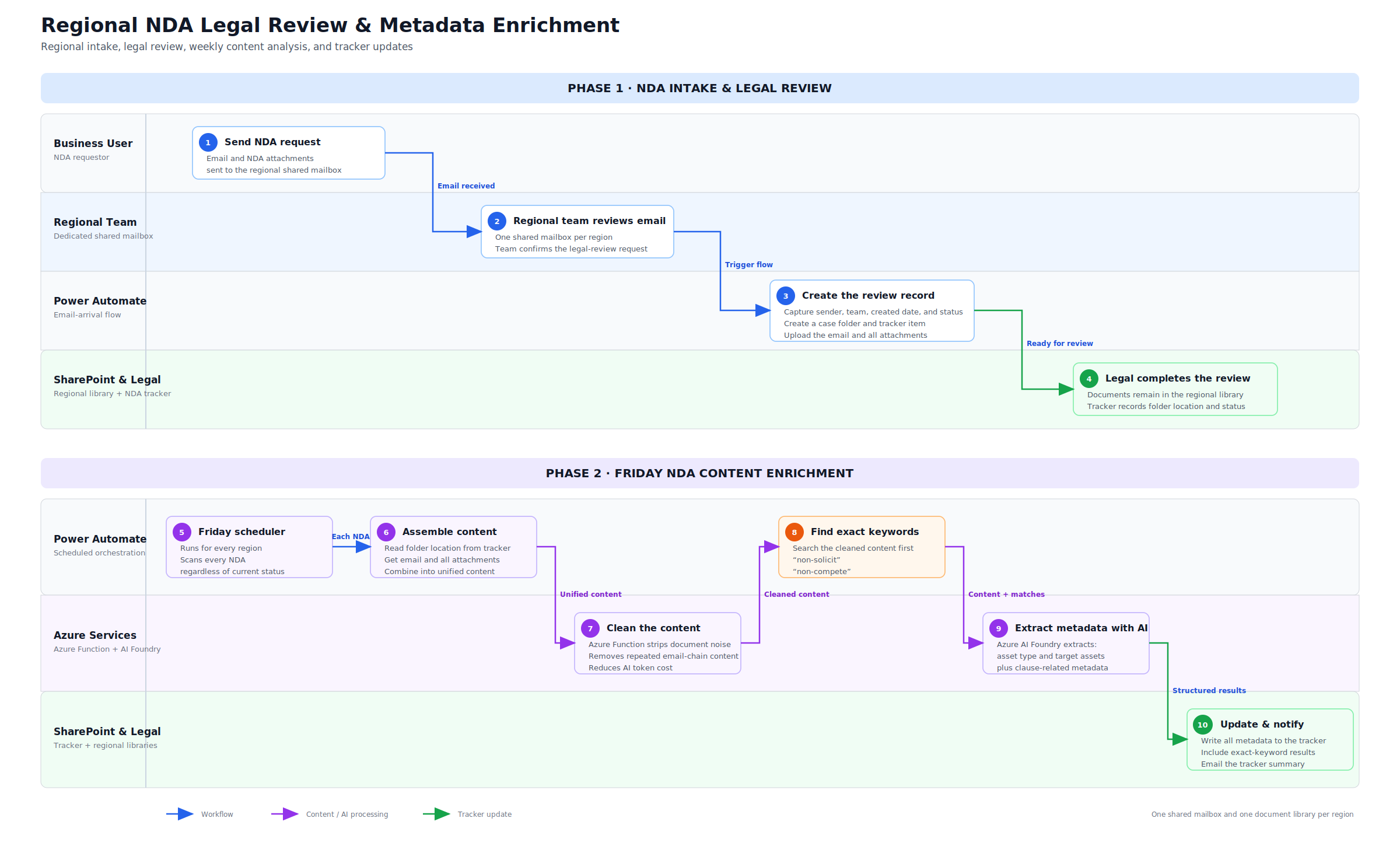
Phase 1: Automating NDA Intake and Legal Review
When a user sends an NDA to the dedicated regional shared mailbox, Power Automate starts the intake process.
The workflow:
- Captures the sender’s email address, regional team, created date, and initial status.
- Creates a dedicated folder in the region’s SharePoint document library.
- Uploads the original email and all attachments.
- Creates an item in the NDA tracker.
- Stores the SharePoint folder location in the tracker so the workflow can retrieve the complete case later.
- Allows Legal to update the review status as work progresses.
This creates a structured record without changing the familiar email-based experience for business users.
Phase 2: Automating Weekly Analysis and Reporting
Every Friday, a scheduled Power Automate flow runs for each region. It scans all NDA tracker items, regardless of their current status.
For each NDA, the workflow:
- Reads the folder location from the NDA tracker.
- Retrieves the original email and all related attachments.
- Combines the content into a unified payload.
- Sends the content to an Azure Function cleanup microservice.
- Removes repeated email-chain text, signatures, disclaimers, and other noise.
- Searches the cleaned content for exact terms such as non-solicit and non-compete.
- Uses Azure AI Foundry to extract structured metadata, including asset type, target assets, and clause-related information.
- Updates the NDA tracker with the extracted metadata and keyword results.
- Produces an email-ready tracker summary for Legal and the relevant business stakeholder.
Why the Cleanup Microservice Matters
Email chains and legal documents can contain repeated content that adds little value to the analysis. Sending everything directly to an AI model would increase token usage and could make extraction less precise.
The Azure Function acts as a preprocessing layer. It removes noise before the content reaches the AI service. This design provides three benefits:
- Lower AI-processing cost
- Cleaner input for metadata extraction
- Separation between deterministic content cleanup and AI-based interpretation
The workflow also checks exact keywords before using AI. Deterministic searches are appropriate when the business needs to know whether specific language is present. AI is then used for fields that require interpretation, such as identifying asset types or target assets.
Business Impact
The solution replaces a repetitive weekly reporting process with an automated, traceable workflow.
It enables the Legal team to:
- Spend less time collecting and formatting status information
- Maintain a consistent process across regions
- Give business stakeholders a current view of NDA activity
- Identify requests that may require priority attention
- Support decisions about which requests can be deprioritized or dropped
- Retrieve the original email and documents directly from the tracker
- Build structured data for future reporting and analytics
For leadership, the main benefit is visibility. Instead of waiting for manually assembled updates, each stakeholder receives a consistent summary based on the same underlying tracker data.
Technical Architecture
| Capability | Technology | Purpose |
|---|---|---|
| Business intake | Regional shared mailboxes | Preserves the familiar email-submission experience |
| Workflow orchestration | Power Automate | Processes incoming requests and runs the Friday schedule |
| Document storage | SharePoint regional libraries | Stores the email and NDA attachments by case |
| Operational tracking | SharePoint NDA tracker | Stores sender, team, dates, status, folder location, and extracted metadata |
| Content preprocessing | Azure Function | Removes noise and reduces unnecessary AI token usage |
| Deterministic detection | Exact-keyword search | Finds terms such as non-solicit and non-compete |
| Metadata extraction | Azure AI Foundry | Extracts asset type, target assets, and related structured fields |
| Stakeholder communication | Automated email summary | Gives Legal and business stakeholders a consistent weekly view |
Design Decisions
Keep Email as the Entry Point
Users did not need to learn a new application. They continued sending requests to the regional mailbox, while automation created the structured records behind the scenes.
Preserve the Source Documents
The original email and attachments were stored together in SharePoint. This provided a clear link between the tracker item and the documents used during legal review.
Use Deterministic Logic Before AI
Exact keyword matching was used for specific legal terms. AI was reserved for metadata that required interpretation. This made the workflow easier to explain, test, and govern.
Reduce Content Before Model Processing
The cleanup microservice reduced noise and token consumption before invoking Azure AI Foundry.
Keep People in Control
The workflow supports Legal’s review process; it does not make legal decisions. Legal users remain responsible for determining priority, review status, and whether a request should proceed or be dropped.
What This Project Demonstrates
This project demonstrates my ability to translate an operational problem into an end-to-end technical solution.
It brings together:
- Business-process analysis
- Microsoft 365 solution architecture
- Power Automate orchestration
- SharePoint information architecture
- Azure Functions integration
- Responsible use of AI for structured extraction
- Cost-aware content preprocessing
- Human review and operational governance
The most important outcome was not the use of a particular technology. It was the creation of a reliable process that reduced manual effort, improved visibility, and gave Legal and business stakeholders better information for weekly prioritization decisions.
Key Takeaway
Useful enterprise AI solutions often begin with a straightforward question:
What repetitive work prevents a team from spending time on higher-value decisions?
In this case, the answer was manual NDA intake, tracking, analysis, and weekly reporting. By combining workflow automation, structured storage, deterministic checks, and targeted AI extraction, the process became easier to manage, easier to explain, and more useful to the business.