Building Financial Pandit Toward Enterprise Readiness: From Local to Docker to Azure
- Purvish Shah
- Enterprise AI,AI APP,AI Agents
- 14 Nov, 2026
How I am evolving a local CrewAI application into a hosted system with defined agent responsibilities, managed data services, and user authentication—and what still needs to be built.
I started learning CrewAI because I wanted to understand how to build an application where AI could coordinate work across different agents.
I needed a use case that would give those agents something meaningful to do. I chose a financial advisor application based on credit card and bank statements.
The idea was simple: bring financial transactions together, ask questions in plain language, and get an explanation supported by the data.
For example:
Show my spending by category for September, compare it with August, and explain the changes with meaningful charts.
That question gave me a practical starting point. The application would need to retrieve transactions, calculate differences, create a chart, and explain the findings.
I called it Financial Pandit.
It began as a way to learn CrewAI, but my focus has grown into building toward an enterprise-grade application. I want to understand what it takes to make the system usable, secure, reliable, and maintainable beyond my development machine.
I did not start by designing the entire Azure application. I started locally, with a question and a crew of agents.
Once I could get a useful response in the console, I wanted a chat interface and a repeatable way to run the components together. That led to FastAPI, LibreChat, and Docker.
After the Docker setup worked locally, I moved the application to Azure.
This post follows that evolution toward enterprise readiness: proving the agent workflow locally, organizing the application in Docker, and establishing a hosted foundation in Azure. Each stage adds responsibilities around how the application runs, who can access it, and how its results can be checked.
Stage 1: Making the Agent Application Work Locally
Starting with the Data
Credit card and bank statements were the starting point for the use case. PostgreSQL became the store for the transaction data used in the analysis.
This gave the agents an evidence source. When I asked about monthly spending, I wanted the answer to come from the stored transactions, with calculations I could check.
During transaction ingestion, I used OpenAI’s Decision API to assign a category to each transaction. I stored that category in PostgreSQL alongside the other transaction fields, making it available for category-based spending analysis.
The broader goal is to make uploading statements the entry point for the application. The automated ingestion pipeline is still a next step; the current analysis works with transaction data already loaded into PostgreSQL.
Designing the CrewAI Agents
My first implementation step was to design and test the CrewAI agents on my local machine. Before adding an API, chat interface, or cloud hosting, I wanted to understand how the coordinator would divide the work and combine the results.
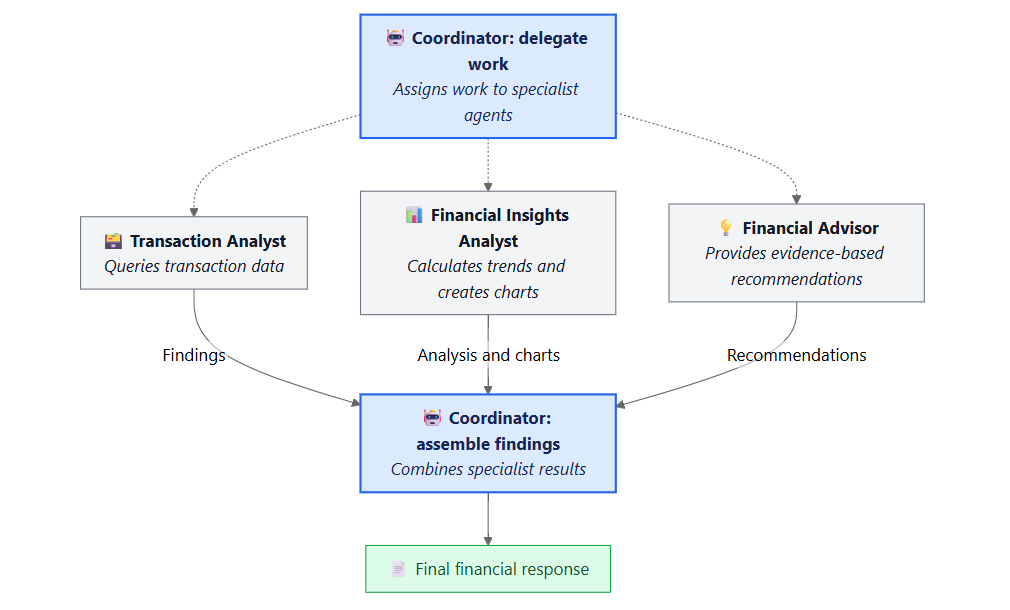
The architecture diagram captures that design: a coordinator delegates to three specialists, receives their findings, and assembles the final financial response.
The coordinator appears twice in the diagram to show its two responsibilities. It is the same agent, first assigning work and later bringing the findings together. There are four agents in total.
Four Agents, with Different Responsibilities
I organized the application around four LLM-driven agents.
| Agent | Responsibility |
|---|---|
| Coordinator | Interprets the request, delegates work, and assembles the final response |
| Transaction Analyst | Executes read-only database queries to retrieve evidence |
| Financial Insights Analyst | Calculates trends and creates charts |
| Financial Advisor | Explains the findings and gives evidence-based advice |
All four agents use language models. Their prompts and available tools constrain the work they can perform.
Only the coordinator has allow_delegation: true.
That was an important design choice for me. I wanted one agent responsible for coordinating the answer, with specialists contributing within their assigned roles.
The Transaction Analyst has the database tools. The Financial Insights Analyst works from supplied evidence and can create charts. The Financial Advisor explains the findings without needing to query the database.
These are useful boundaries, but prompts alone are not an access-control mechanism. Read-only query tools and input validation also have to enforce their restrictions.
Sequential on the Outside, Dynamic on the Inside
One detail took some care to describe accurately.
The outer process is sequential: the crew starts, the coordinator task runs, and a final response is returned.
Inside that coordinator task, delegation is dynamic. The coordinator decides which specialists to involve for the question.
The four agents are not four fixed tasks that always run in order.
For a spending comparison, retrieval, trend analysis, and explanation may all be useful. A simpler question may need less work.
This helped me distinguish the order in which the application starts its work from the decisions an agent makes while doing that work.
It also gave me more specific questions to investigate. Did the coordinator request the right evidence? Were the calculations correct? Did the final explanation stay within what the data supported?
The Console Result Became the Starting Point for an API
The first version ran in the console.
That was enough to test the basic idea: could I ask a question and get an answer assembled from database evidence and specialist contributions?
Once I could do that, I wanted a more convenient way to use it.
I converted the agent application into an API using FastAPI. That gave the application an interface another client could call.
The backend still handled the agent work. FastAPI provided the boundary between a request coming in and an answer going back.
Stage 2: Turning the Experiment into a Docker Application
The local agent implementation proved that the basic workflow could run. The next goal was to make it easier to interact with and run as a connected application.
Adding Chat with LibreChat
I chose LibreChat for the chat interface and connected it to Financial Pandit through the FastAPI adapter.
The adapter exposes an OpenAI-compatible chat completions endpoint. It passes the user question and request-scoped conversation context into the agent application.
This made the project easier to interact with. I could ask a question, read the answer, and ask a follow-up in the same interface.
It also introduced another responsibility: managing the conversation around the agent execution.
A follow-up such as “Now show only groceries” depends on the earlier exchange. The backend needs the relevant context to understand it.
Stored chat history and agent memory are different things. Keeping conversations available does not automatically mean the agents have persistent memory or should receive every previous message.
Running the Components Together
After getting results in the console and exposing the application through an API, I moved to Docker.
The main local setup had three containers:
| Container | Purpose |
|---|---|
| LibreChat | Chat interface |
| FinancialPanditAPI | FastAPI adapter and CrewAI application |
| PostgreSQL | Financial transaction data |
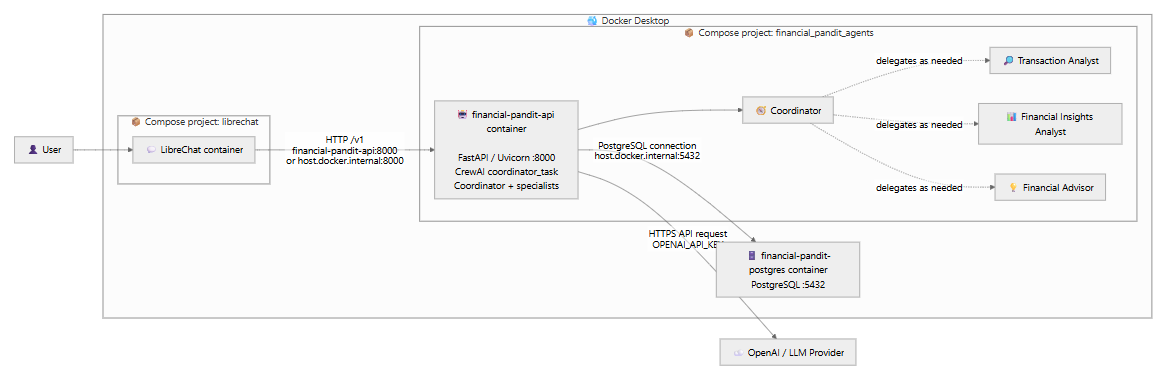
The Docker diagram shows the request path. The user interacts with LibreChat, which sends an HTTP request to the FinancialPanditAPI container. FastAPI, served by Uvicorn on port 8000, starts the CrewAI coordinator task. The coordinator delegates to the specialists as needed and assembles the response returned through the API to LibreChat.
The four agents run inside the FinancialPanditAPI application. They are not four additional containers. The API application connects to PostgreSQL for transaction evidence and makes HTTPS requests to OpenAI or the configured LLM provider.
The diagram also shows LibreChat and Financial Pandit under separate Docker Compose projects. They still need a reachable API address and the appropriate networking configuration to communicate.
This gave me a concrete application to run locally, with separate components that needed to communicate.
I had to think about configuration and database connections across container boundaries. A setting that worked when everything ran directly on my laptop could require a different value inside a container.
Docker became the bridge to the next stage: moving the application to Azure.
Stage 3: Moving the Working Docker Application to Azure
With the components working together locally, the next goal was to host the application outside my development machine. I could carry the containerized application forward while moving supporting services to Azure.
I pushed the application image to Azure Container Registry and deployed the API to Azure Container Apps. LibreChat also runs as a Container App.
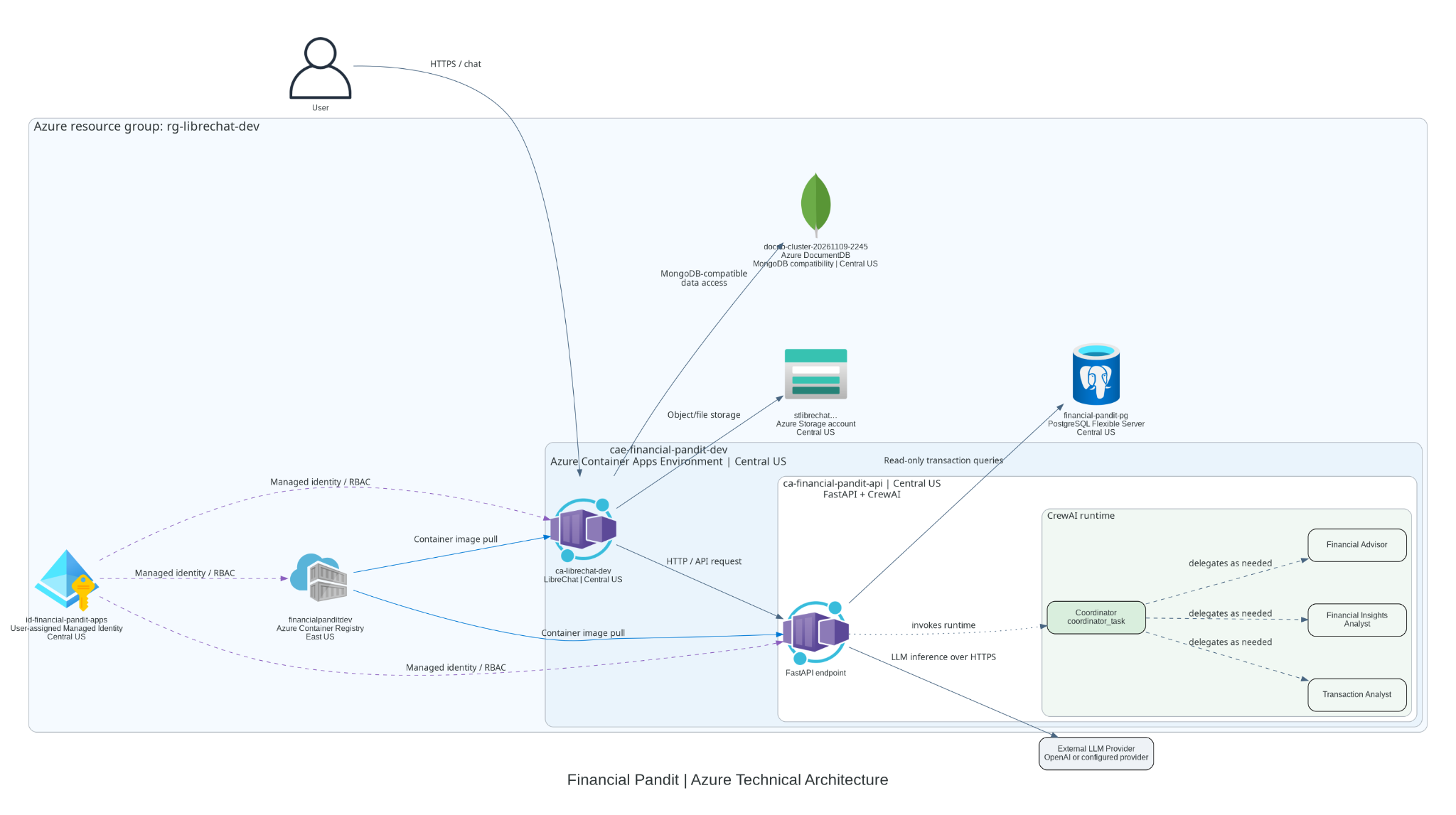
The Azure diagram brings the pieces together. The user reaches LibreChat over HTTPS. LibreChat calls FinancialPanditAPI, where FastAPI invokes the CrewAI runtime. The coordinator delegates work to the specialists, and the backend retrieves financial evidence through read-only transaction queries against PostgreSQL. Model inference uses HTTPS calls to OpenAI or the configured provider.
LibreChat connects separately to Azure DocumentDB for chat history and login sessions, and to Azure Storage for object/file storage. These supporting services sit alongside the two container applications.
Azure Container Registry supplies the images used to deploy the applications. Those image-pull connections support deployment and startup; they are separate from the path a chat request follows. The managed identity and RBAC links represent the workload permissions around those resources.
The Azure setup now includes these resources:
| Azure resource | Role in Financial Pandit |
|---|---|
| Azure Container Apps | Hosts LibreChat and FinancialPanditAPI |
| Container Apps Environment | Shared hosting environment for the container apps |
| Azure Container Registry | Stores the application container images |
| Azure Database for PostgreSQL Flexible Server | Stores financial transaction data |
| Azure DocumentDB with MongoDB compatibility | Stores chat history and login session data |
| Managed Identity | Identity resource for permitted Azure service access |
| Azure Storage account | Object/file storage connected to LibreChat; automated statement ingestion remains planned |
The local design did not become three identical containers hosted somewhere else. The API and chat interface became hosted container applications, while PostgreSQL moved to a managed database service.
Azure DocumentDB supports the conversation and session side of the application. That data serves a different purpose from the transactions the agents analyze.
Receiving a response from the hosted application was a meaningful milestone. The project had grown from a console experiment into an application with a chat interface and cloud infrastructure around it.
Adding User Authentication with Entra ID
I have also implemented Microsoft Entra ID authentication.
That is part of the current application, alongside the hosted components.
I keep it separate from managed identity when describing the architecture. Entra ID authentication identifies the person signing in. Managed identity provides an identity for an Azure workload to access supported resources with the permissions granted to it.
The next security work builds on the existing authentication. I still need to review how access is enforced across backend APIs, transactions, conversation history, and generated artifacts.
A working sign-in experience is a milestone. It is also one part of the wider security design.
Seeing the Hosted Application Return an Answer
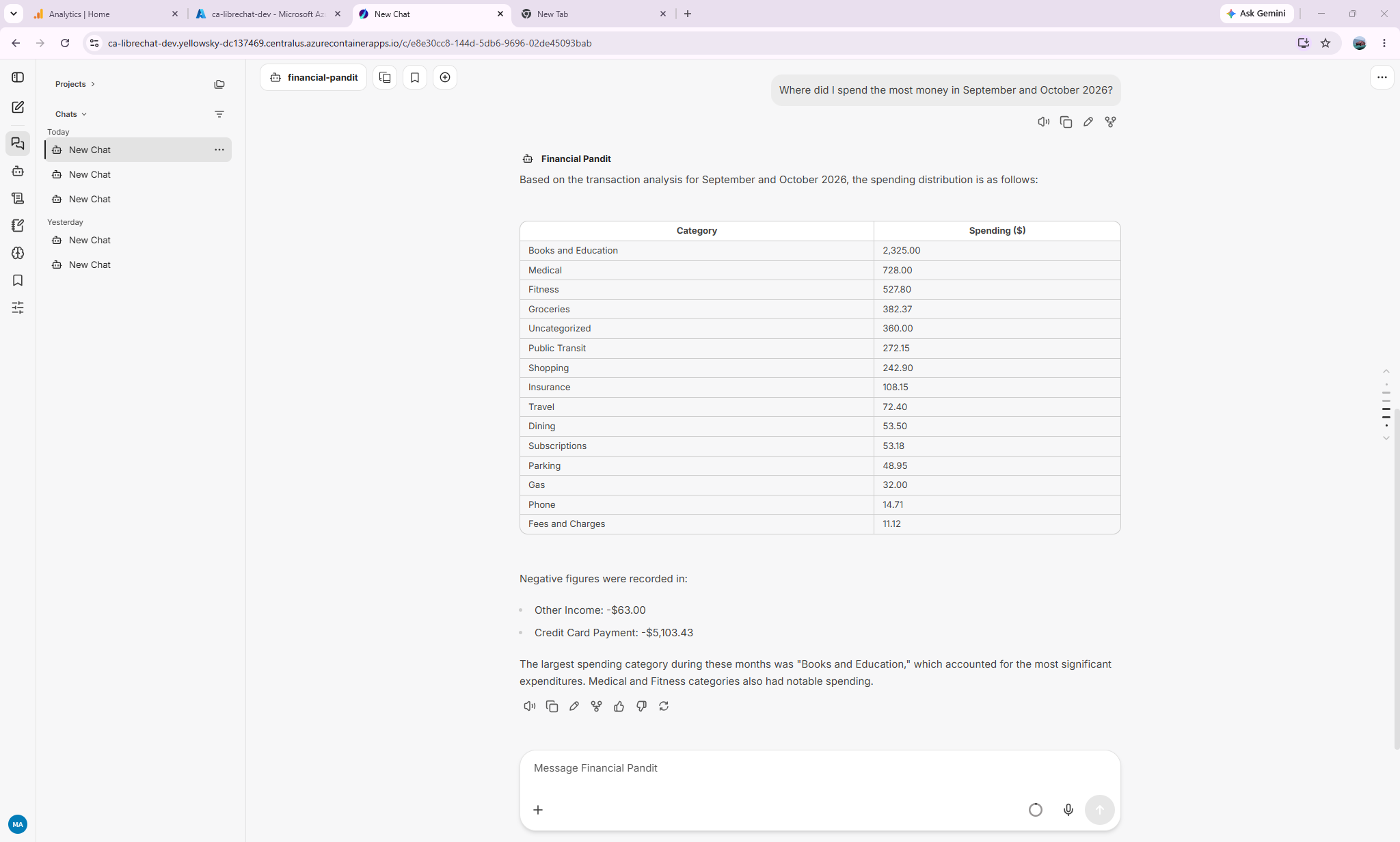
After moving the application through local execution, Docker, and Azure, I could ask a question through the hosted LibreChat interface:
Where did I spend the most money in September and October 2026?
The displayed response identifies Books and Education as the largest spending category at $2,325.00, followed by Medical and Fitness. It presents a table and a short explanation, with negative entries listed separately.
For me, this was the visible result of connecting the pieces: a question entered in the chat interface, processed by the backend agent application, and returned as a readable answer.
This screenshot shows the application responding. Verifying the underlying totals, category treatment, and handling of payments and income remains a separate part of evaluating its accuracy.
What’s Next: Making the Application Easier to Operate and Protect
The application now runs in Azure with Entra ID authentication. My next focus is strengthening how I observe, control, and secure it.
Observability Across the Request
I plan to add structured logs, metrics, and traces so I can follow a request from LibreChat through FastAPI, CrewAI delegation, database tools, and model calls.
I want to see where time is spent, which tools fail, how many model calls a question triggers, and what those calls cost. Azure Monitor and Application Insights are part of the direction I am exploring, along with alerts for failures and unusual behavior.
Because the application handles financial information, I also need to be deliberate about what gets logged. Useful diagnostics should not require recording full statements, credentials, or sensitive conversation content.
API Management as a Controlled Entry Point
I plan to introduce Azure API Management to validate access tokens, apply appropriate rate limits, and manage access to the backend API.
This builds on the Entra ID authentication already implemented. I also need to protect the backend so callers cannot bypass the gateway and its policies.
Azure AI Foundry for Model Access
I plan to move model access to Azure AI Foundry, using model deployments that fit the application’s requirements.
That change will involve configuring and testing the model endpoint, authentication, model behavior, latency, and cost. I will also verify support for the capabilities the application uses, including the separate transaction-categorization step, rather than assuming every existing API call transfers unchanged.
CrewAI will continue to coordinate the agents. Foundry is the planned model-access layer in this evolution.
Tighter Network Access and Permissions
I want to restrict access to the application and its supporting services more deliberately. That includes IP restrictions where appropriate, tighter database access rules, and reviewing internal ingress or private connectivity for backend services.
The network design needs to preserve the required paths between LibreChat, APIM, the API, and the data services. I will also review managed identity permissions, secret handling, and authorization for transactions, conversations, and generated artifacts.
These controls complement user authentication. I need to verify both who is signed in and what that user or workload is permitted to access.
Automated Statement Ingestion
The next functional addition is the file-upload ingestion pipeline.
I already use OpenAI’s Decision API to categorize transactions during ingestion. The next step is connecting statement uploads to an automated workflow: validate the file, extract and normalize transactions, categorize them, detect duplicates, and write accepted records to PostgreSQL.
I want users to see processing status and any records that need review. The workflow should preserve ownership and source information so a transaction can be traced back to its input.
Together, these changes move the project toward an application I can monitor, troubleshoot, protect, and extend with more confidence.
What Changed as the Application Evolved
I began with a question about CrewAI: how do I get agents to work together?
Working through Financial Pandit has expanded that question. How do I expose the application through an API? How do I make it usable through chat? How do I run it in containers, host it, authenticate users, and protect the data it handles?
Each stage solved a different problem. The local version helped me understand agent coordination. Docker helped me run the interface, API, and database as connected components. Azure brought hosting, managed services, and identity into the application.
That progression is what has made the project useful to me.
I have a working cloud application to build on, with Entra ID authentication already implemented. Observability, APIM, Azure AI Foundry model integration, tighter network access, and automated ingestion are the next stages.
My focus is to keep evolving Financial Pandit into an enterprise-grade application. Local execution, Docker, and Azure are stages in that work. The next progress needs to be demonstrated through stronger controls, reliable data ingestion, and evidence that the system behaves as intended.
Related Work
You can also explore the My Krishna App and read I Built My First iOS App. Here’s What Happened After Launch. for another example of taking an AI project from an initial idea to a published application.
If you have moved an AI experiment from the console into a hosted application, which step taught you the most?